Filters
Overview
Filtration is the process of separating suspended particles from a fluid (liquid or gas) by passing it through a permeable medium. In engineering systems, filters, screens, and strainers are essential components for protecting sensitive equipment (pumps, compressors, valves, nozzles) from debris, preventing erosion, and ensuring product purity in industrial processes. Filter selection involves balancing particle capture efficiency against flow resistance and pressure drop.
The primary engineering concern with filters is the pressure drop (\Delta P) they induce. As fluid passes through the media, mechanical energy is lost to viscous friction and turbulence, which must be compensated by pumps or fans. This pressure loss is typically characterized by a dimensionless loss coefficient (K) that relates the pressure drop to the dynamic pressure:
\Delta P = K \cdot \frac{1}{2} \rho v^2
where \rho is the fluid density and v is the approach velocity. The loss coefficient depends on filter geometry (open area ratio, wire/bar thickness, hole diameter) and edge sharpness. These tools compute K using empirically-validated correlations from fluids and fluid mechanics handbooks.
Implementation: All pressure drop calculations leverage the fluids library, which implements industry-standard correlations from Idelchik, Crane, and other authoritative sources. These correlations apply to fully turbulent flow (Re > 10^4) through clean, unobstructed filter elements.
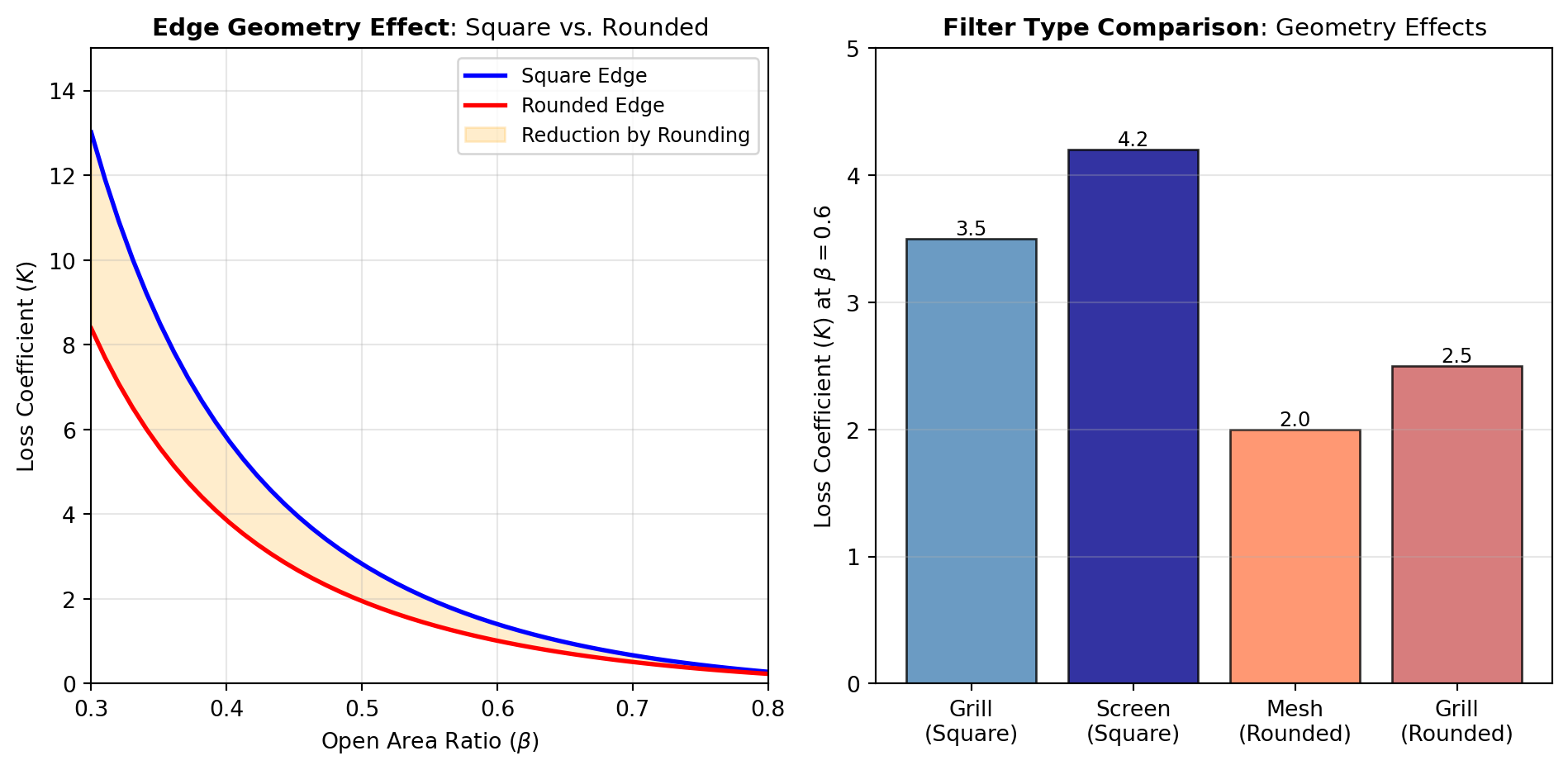
Figure 1 illustrates how the loss coefficient varies with open area ratio and edge geometry for common filter types.
Filter Geometries: Filters are categorized by their structural pattern and edge geometry. Grills and perforated plates consist of circular holes drilled or punched through a flat plate—common in HVAC intakes, particle separators, and process vessel screens. Wire screens and bar screens are woven or welded grid patterns used for coarse particle removal in wastewater, cooling water, and pulp processing. Mesh screens (woven wire cloth) provide finer filtration for hydraulic systems and air filtration.
Edge Geometry Effects: The sharpness of the filter element edges significantly impacts pressure drop. Square-edged filters (SQ_EDGE_GRILL, SQ_EDGE_SCREEN) have higher loss coefficients due to flow separation and recirculation at sharp corners. Round-edged filters (RND_EDGE_GRILL, RND_EDGE_SCREEN, RND_EDGE_MESH) reduce pressure drop by 20-40% through streamlined entry, minimizing separation. Chamfering or radiusing edges during manufacturing is a common design optimization.
Open Area Ratio: All correlations are functions of the open area ratio (or solidity), defined as the fraction of the filter area that is open to flow. Higher open area ratios (lower solidity) reduce pressure drop but may compromise structural strength or particle capture. Typical values range from 0.3 to 0.8 depending on application requirements. Use the RND_EDGE_GRILL or SQ_EDGE_GRILL tools for perforated plates, the screen tools for bar/wire grids based on edge geometry.
RND_EDGE_GRILL
Computes the pressure-loss coefficient K for a rounded square grill, square bar screen, or perforated plate with rounded edges from the open-area fraction \alpha.
The base correlation uses an empirical lookup in \alpha. When thickness l, hydraulic diameter D_h, and Darcy friction factor f_d are all supplied, the source adds a friction term to the lookup value:
K = K_{\text{lookup}} + \frac{f_d l}{\alpha^2 D_h}
The documented correlation applies for 0.3 \leq \alpha \leq 0.7, and the reported loss coefficient is referenced to the upstream approach velocity.
Excel Usage
=RND_EDGE_GRILL(alpha, l, Dh, fd)alpha(float, required): Fraction of grill open to flow (must be 0.3-0.7), [-]l(float, optional, default: null): Thickness of the grill or plate, [m]Dh(float, optional, default: null): Hydraulic diameter of gap in grill, [m]fd(float, optional, default: null): Darcy friction factor, [-]
Returns (float): Loss coefficient K, [-], or error message (str) if input is invalid.
Example 1: Rounded-edge grill at alpha 0.4 without friction correction
Inputs:
| alpha |
|---|
| 0.4 |
Excel formula:
=RND_EDGE_GRILL(0.4)Expected output:
1
Example 2: Rounded-edge grill with friction correction inputs
Inputs:
| alpha | l | Dh | fd |
|---|---|---|---|
| 0.4 | 0.15 | 0.002 | 0.0185 |
Excel formula:
=RND_EDGE_GRILL(0.4, 0.15, 0.002, 0.0185)Expected output:
9.67187
Example 3: Rounded-edge grill at mid-range openness alpha 0.5
Inputs:
| alpha |
|---|
| 0.5 |
Excel formula:
=RND_EDGE_GRILL(0.5)Expected output:
0.6
Example 4: Rounded-edge grill at the upper valid alpha bound
Inputs:
| alpha |
|---|
| 0.7 |
Excel formula:
=RND_EDGE_GRILL(0.7)Expected output:
0.2
Python Code
Show Code
from fluids.filters import round_edge_grill as fluids_round_edge_grill

def rnd_edge_grill(alpha, l=None, Dh=None, fd=None):
    """
    Calculate the loss coefficient for a rounded edge grill or perforated plate.

    See: https://fluids.readthedocs.io/fluids.filters.html#fluids.filters.round_edge_grill

    This example function is provided as-is without any representation of accuracy.

    Args:
        alpha (float): Fraction of grill open to flow (must be 0.3-0.7), [-]
        l (float, optional): Thickness of the grill or plate, [m] Default is None.
        Dh (float, optional): Hydraulic diameter of gap in grill, [m] Default is None.
        fd (float, optional): Darcy friction factor, [-] Default is None.

    Returns:
        float: Loss coefficient K, [-], or error message (str) if input is invalid.
    """
    try:
      # Validate and convert alpha
      try:
        alpha = float(alpha)
      except (ValueError, TypeError):
        return "Error: alpha must be a number."

      # Validate alpha range (0.3 to 0.7 for round_edge_grill)
      if alpha < 0.3 or alpha > 0.7:
        return "Error: alpha must be between 0.3 and 0.7."

      # Validate and convert optional parameters
      if l is not None:
        try:
          l = float(l)
        except (ValueError, TypeError):
          return "Error: l must be a number."
        if l <= 0:
          return "Error: l must be positive."

      if Dh is not None:
        try:
          Dh = float(Dh)
        except (ValueError, TypeError):
          return "Error: Dh must be a number."
        if Dh <= 0:
          return "Error: Dh must be positive."

      if fd is not None:
        try:
          fd = float(fd)
        except (ValueError, TypeError):
          return "Error: fd must be a number."
        if fd <= 0:
          return "Error: fd must be positive."

      result = fluids_round_edge_grill(alpha=alpha, l=l, Dh=Dh, fd=fd)
      if result != result or result in (float('inf'), float('-inf')):
        return "Error: Result is not finite."
      return float(result)
    except Exception as e:
      return f"Error: {str(e)}"
Online Calculator
Fraction of grill open to flow (must be 0.3-0.7), [-]
Thickness of the grill or plate, [m]
Hydraulic diameter of gap in grill, [m]
Darcy friction factor, [-]
RND_EDGE_MESH
Computes the pressure-loss coefficient K for rounded-edge open mesh and net geometries using empirical subtype-specific correlations based on open-area fraction.
For each supported subtype, K is modeled as a quadratic function of blockage (1-\alpha):
K = a(1-\alpha) + b(1-\alpha)^2
where coefficients (a,b) depend on mesh pattern. An inclination-angle correction is then applied relative to approach flow.
The source correlation is intended for turbulent flow and high-open-area meshes, typically 0.85 \leq \alpha \leq 1, with K referenced to the upstream approach velocity.
Excel Usage
=RND_EDGE_MESH(alpha, mesh_type, angle)alpha(float, required): Fraction of net/screen open to flow, [-]mesh_type(str, optional, default: “diamond pattern wire”): Type of mesh patternangle(float, optional, default: 0): Angle of inclination (0 = straight, 90 = parallel to flow), [degrees]
Returns (float): Loss coefficient K, [-], or error message (str) if input is invalid.
Example 1: Diamond pattern wire mesh at alpha 0.96
Inputs:
| alpha |
|---|
| 0.96 |
Excel formula:
=RND_EDGE_MESH(0.96)Expected output:
0.02888
Example 2: Diamond pattern wire mesh inclined at 33 degrees
Inputs:
| alpha | angle |
|---|---|
| 0.96 | 33 |
Excel formula:
=RND_EDGE_MESH(0.96, 33)Expected output:
0.0203133
Example 3: Round bar screen subtype at alpha 0.9
Inputs:
| alpha | mesh_type |
|---|---|
| 0.9 | round bar screen |
Excel formula:
=RND_EDGE_MESH(0.9, "round bar screen")Expected output:
0.097
Example 4: Knotted net subtype at alpha 0.95
Inputs:
| alpha | mesh_type |
|---|---|
| 0.95 | knotted net |
Excel formula:
=RND_EDGE_MESH(0.95, "knotted net")Expected output:
0.04725
Python Code
Show Code
from fluids.filters import round_edge_open_mesh as fluids_round_edge_open_mesh

def rnd_edge_mesh(alpha, mesh_type='diamond pattern wire', angle=0):
    """
    Calculate the loss coefficient for a round edged open net or screen mesh.

    See: https://fluids.readthedocs.io/fluids.filters.html#fluids.filters.round_edge_open_mesh

    This example function is provided as-is without any representation of accuracy.

    Args:
        alpha (float): Fraction of net/screen open to flow, [-]
        mesh_type (str, optional): Type of mesh pattern Valid options: Diamond Pattern Wire, Round Bar Screen, Knotted Net, Knotless Net. Default is 'diamond pattern wire'.
        angle (float, optional): Angle of inclination (0 = straight, 90 = parallel to flow), [degrees] Default is 0.

    Returns:
        float: Loss coefficient K, [-], or error message (str) if input is invalid.
    """
    try:
      # Validate and convert alpha
      try:
        alpha = float(alpha)
      except (ValueError, TypeError):
        return "Error: alpha must be a number."

      # Validate and convert angle
      try:
        angle = float(angle)
      except (ValueError, TypeError):
        return "Error: angle must be a number."

      # Validate ranges
      if alpha < 0.85 or alpha > 1:
        return "Error: alpha must be between 0.85 and 1."
      if angle < 0 or angle > 90:
        return "Error: angle must be between 0 and 90 degrees."

      # Validate mesh_type
      valid_types = ['round bar screen', 'diamond pattern wire', 'knotted net', 'knotless net']
      if mesh_type not in valid_types:
        return f"Error: mesh_type must be one of {valid_types}."

      result = fluids_round_edge_open_mesh(alpha=alpha, subtype=mesh_type, angle=angle)
      if result != result or result in (float('inf'), float('-inf')):
        return "Error: Result is not finite."
      return float(result)
    except Exception as e:
      return f"Error: {str(e)}"
Online Calculator
Fraction of net/screen open to flow, [-]
Type of mesh pattern
Angle of inclination (0 = straight, 90 = parallel to flow), [degrees]
RND_EDGE_SCREEN
Computes the pressure-loss coefficient K for a rounded-edge wire or bar screen as a function of open-area fraction, Reynolds number, and optional inclination angle.
The underlying method uses tabulated empirical data with interpolation over Reynolds number and openness. Outside the tabulated Reynolds-number range of about 20 \leq Re \leq 400, the source uses constant endpoint values. For inclination, values above 85 degrees use the 85-degree correlation.
The correlation is intended for approximately 0.05 \leq \alpha \leq 0.8, and the resulting K is referenced to the upstream approach velocity.
Excel Usage
=RND_EDGE_SCREEN(alpha, Re, angle)alpha(float, required): Fraction of screen open to flow, [-]Re(float, required): Reynolds number of flow through screen (D = space between rods), [-]angle(float, optional, default: 0): Angle of inclination (0 = straight, 90 = parallel to flow), [degrees]
Returns (float): Loss coefficient K, [-], or error message (str) if input is invalid.
Example 1: Rounded-edge screen at alpha 0.5 and Re 100
Inputs:
| alpha | Re |
|---|---|
| 0.5 | 100 |
Excel formula:
=RND_EDGE_SCREEN(0.5, 100)Expected output:
2.1
Example 2: Rounded-edge screen inclined at 45 degrees
Inputs:
| alpha | Re | angle |
|---|---|---|
| 0.5 | 100 | 45 |
Excel formula:
=RND_EDGE_SCREEN(0.5, 100, 45)Expected output:
1.05
Example 3: Rounded-edge screen at the low Reynolds table bound
Inputs:
| alpha | Re |
|---|---|
| 0.3 | 20 |
Excel formula:
=RND_EDGE_SCREEN(0.3, 20)Expected output:
13.1444
Example 4: Rounded-edge screen at the high Reynolds table bound
Inputs:
| alpha | Re |
|---|---|
| 0.7 | 400 |
Excel formula:
=RND_EDGE_SCREEN(0.7, 400)Expected output:
0.541224
Python Code
Show Code
from fluids.filters import round_edge_screen as fluids_round_edge_screen

def rnd_edge_screen(alpha, Re, angle=0):
    """
    Calculate the loss coefficient for a round edged wire screen or bar screen.

    See: https://fluids.readthedocs.io/fluids.filters.html#fluids.filters.round_edge_screen

    This example function is provided as-is without any representation of accuracy.

    Args:
        alpha (float): Fraction of screen open to flow, [-]
        Re (float): Reynolds number of flow through screen (D = space between rods), [-]
        angle (float, optional): Angle of inclination (0 = straight, 90 = parallel to flow), [degrees] Default is 0.

    Returns:
        float: Loss coefficient K, [-], or error message (str) if input is invalid.
    """
    try:
      # Validate and convert alpha
      try:
        alpha = float(alpha)
      except (ValueError, TypeError):
        return "Error: alpha must be a number."

      # Validate and convert Re
      try:
        Re = float(Re)
      except (ValueError, TypeError):
        return "Error: Re must be a number."

      # Validate and convert angle
      try:
        angle = float(angle)
      except (ValueError, TypeError):
        return "Error: angle must be a number."

      # Validate ranges
      if alpha < 0.05 or alpha > 0.8:
        return "Error: alpha must be between 0.05 and 0.8."
      if Re <= 0:
        return "Error: Re must be positive."
      if angle < 0 or angle > 90:
        return "Error: angle must be between 0 and 90 degrees."

      result = fluids_round_edge_screen(alpha=alpha, Re=Re, angle=angle)
      if result != result or result in (float('inf'), float('-inf')):
        return "Error: Result is not finite."
      return float(result)
    except Exception as e:
      return f"Error: {str(e)}"
Online Calculator
Fraction of screen open to flow, [-]
Reynolds number of flow through screen (D = space between rods), [-]
Angle of inclination (0 = straight, 90 = parallel to flow), [degrees]
SQ_EDGE_GRILL
Computes the pressure-loss coefficient K for square-edge grills, bar screens, or perforated plates from open-area fraction and optional wall-friction correction terms.
The base relation scales with openness as:
K = \frac{0.5(1-\alpha) + (1-\alpha^2)}{\alpha^2}
When thickness l, hydraulic diameter D_h, and friction factor f_d are supplied, an added friction-loss term modifies the numerator before division by \alpha^2:
K = \frac{0.5(1-\alpha) + (1-\alpha^2) + f_d l / D_h}{\alpha^2}
The coefficient is referenced to the upstream approach velocity.
Excel Usage
=SQ_EDGE_GRILL(alpha, l, Dh, fd)alpha(float, required): Fraction of grill open to flow, [-]l(float, optional, default: null): Thickness of the grill or plate, [m]Dh(float, optional, default: null): Hydraulic diameter of gap in grill, [m]fd(float, optional, default: null): Darcy friction factor, [-]
Returns (float): Loss coefficient K, [-], or error message (str) if input is invalid.
Example 1: Square-edge grill at alpha 0.45 without friction correction
Inputs:
| alpha |
|---|
| 0.45 |
Excel formula:
=SQ_EDGE_GRILL(0.45)Expected output:
5.2963
Example 2: Square-edge grill with thickness and friction correction
Inputs:
| alpha | l | Dh | fd |
|---|---|---|---|
| 0.45 | 0.15 | 0.002 | 0.0185 |
Excel formula:
=SQ_EDGE_GRILL(0.45, 0.15, 0.002, 0.0185)Expected output:
12.1481
Example 3: Square-edge grill at moderate openness alpha 0.6
Inputs:
| alpha |
|---|
| 0.6 |
Excel formula:
=SQ_EDGE_GRILL(0.6)Expected output:
2.33333
Example 4: Square-edge grill at high openness alpha 0.8
Inputs:
| alpha |
|---|
| 0.8 |
Excel formula:
=SQ_EDGE_GRILL(0.8)Expected output:
0.71875
Python Code
Show Code
from fluids.filters import square_edge_grill as fluids_square_edge_grill

def sq_edge_grill(alpha, l=None, Dh=None, fd=None):
    """
    Calculate the loss coefficient for a square edged grill or perforated plate.

    See: https://fluids.readthedocs.io/fluids.filters.html#fluids.filters.square_edge_grill

    This example function is provided as-is without any representation of accuracy.

    Args:
        alpha (float): Fraction of grill open to flow, [-]
        l (float, optional): Thickness of the grill or plate, [m] Default is None.
        Dh (float, optional): Hydraulic diameter of gap in grill, [m] Default is None.
        fd (float, optional): Darcy friction factor, [-] Default is None.

    Returns:
        float: Loss coefficient K, [-], or error message (str) if input is invalid.
    """
    try:
      # Validate and convert alpha
      try:
        alpha = float(alpha)
      except (ValueError, TypeError):
        return "Error: alpha must be a number."

      # Validate alpha range
      if alpha <= 0 or alpha > 1:
        return "Error: alpha must be between 0 and 1."

      # Validate and convert optional parameters
      if l is not None:
        try:
          l = float(l)
        except (ValueError, TypeError):
          return "Error: l must be a number."
        if l <= 0:
          return "Error: l must be positive."

      if Dh is not None:
        try:
          Dh = float(Dh)
        except (ValueError, TypeError):
          return "Error: Dh must be a number."
        if Dh <= 0:
          return "Error: Dh must be positive."

      if fd is not None:
        try:
          fd = float(fd)
        except (ValueError, TypeError):
          return "Error: fd must be a number."
        if fd <= 0:
          return "Error: fd must be positive."

      result = fluids_square_edge_grill(alpha=alpha, l=l, Dh=Dh, fd=fd)
      if result != result or result in (float('inf'), float('-inf')):
        return "Error: Result is not finite."
      return float(result)
    except Exception as e:
      return f"Error: {str(e)}"
Online Calculator
Fraction of grill open to flow, [-]
Thickness of the grill or plate, [m]
Hydraulic diameter of gap in grill, [m]
Darcy friction factor, [-]
SQ_EDGE_SCREEN
Computes the pressure-loss coefficient K for square-edge wire screens, bar screens, or perforated plates based on open-area fraction.
The correlation is implemented through linear interpolation of empirical tabulated values, yielding a monotonic increase in loss as openness decreases.
The resulting coefficient represents head loss relative to the approach velocity upstream of the screen.
Excel Usage
=SQ_EDGE_SCREEN(alpha)alpha(float, required): Fraction of screen open to flow, [-]
Returns (float): Loss coefficient K, [-], or error message (str) if input is invalid.
Example 1: Square-edge screen at very high openness alpha 0.99
Inputs:
| alpha |
|---|
| 0.99 |
Excel formula:
=SQ_EDGE_SCREEN(0.99)Expected output:
0.008
Example 2: Square-edge screen at moderate openness alpha 0.5
Inputs:
| alpha |
|---|
| 0.5 |
Excel formula:
=SQ_EDGE_SCREEN(0.5)Expected output:
3.8
Example 3: Square-edge screen at low openness alpha 0.2
Inputs:
| alpha |
|---|
| 0.2 |
Excel formula:
=SQ_EDGE_SCREEN(0.2)Expected output:
52
Example 4: Square-edge screen at typical openness alpha 0.7
Inputs:
| alpha |
|---|
| 0.7 |
Excel formula:
=SQ_EDGE_SCREEN(0.7)Expected output:
1.1
Python Code
Show Code
from fluids.filters import square_edge_screen as fluids_square_edge_screen

def sq_edge_screen(alpha):
    """
    Calculate the loss coefficient for a square edged wire screen, bar screen, or perforated plate.

    See: https://fluids.readthedocs.io/fluids.filters.html#fluids.filters.square_edge_screen

    This example function is provided as-is without any representation of accuracy.

    Args:
        alpha (float): Fraction of screen open to flow, [-]

    Returns:
        float: Loss coefficient K, [-], or error message (str) if input is invalid.
    """
    try:
      # Validate and convert alpha
      try:
        alpha = float(alpha)
      except (ValueError, TypeError):
        return "Error: alpha must be a number."

      # Validate alpha range
      if alpha <= 0 or alpha > 1:
        return "Error: alpha must be between 0 and 1."

      result = fluids_square_edge_screen(alpha=alpha)
      if result != result or result in (float('inf'), float('-inf')):
        return "Error: Result is not finite."
      return float(result)
    except Exception as e:
      return f"Error: {str(e)}"
Online Calculator
Fraction of screen open to flow, [-]